 Home
Home PC Systems
  SALONBase
 FAQs
FAQs Price
Price Downloads
SALONBase Management System
Increase Profits
Increase Customer Loyalty
Intuitive screens and ease-of-use make SALONBase a real choice for your business. Please read more about some of these features below.
SALONBase has been designed to be used with a touch screen monitior if you have one- but don't worry if you don't, it's still easy to use with a normal keyboard and mouse.
Features on this page : Customer details - Diary - Sales ticket - Gift Vouchers - Payments screen - Reward points - Discount days - SMS text - Mailshot - Style Gallery - Product sales.
Customer details
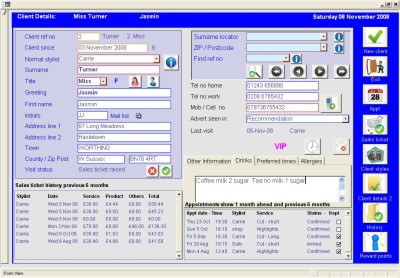 The Customer Details screen records all the information about your individual customers. It gives your staff quick and easy access to the information they’ll need to make your customers feel at home – which is an essential part of running any successful and profitable business.
The customer’s usual stylist is recorded here, along with details of their last visit including the date, and which member of staff took care of them.
Information about your customer’s appointment history can be accessed from this screen as well as other useful information such as your customer’s preferred appointment times, or any allergies they may have to certain products. You can even record whether they prefer coffee with sugar, or tea without.
Customers can be searched for by surname, postal code, or reference number - and any customer can be found within five seconds …so the next time they phone the salon, all their details are on-screen and ready to hand.

Diary with unlimited stylists
Using a computerised diary system - maybe one of the most difficult decisions for a salon to make ! That's why we have designed our diary around the typical paper diary - that everybody is familiar with.
We have incorporated an easy to use system that allows for each stylist to have 48 appointment times on any one day. You can easily add details to each appointment time and have as many stylists on the s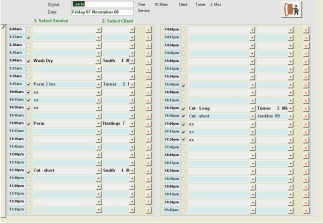 ystem as you need.
When you first select your stylist and the date you are presented with an easy to view visual screen, with all the appointments times taken shown in blue. With one click you enter the more detailed screen - which is the place where you enter names against appointment times. Once you have added the client details to the time slot, you are presented with an appointment screen from which you can set options for SMS reminders or print an appointment card. Within this appointment screen you will automatically see this client’s previous appointment history.
The appointment status is then automatically updated to give you a clear picture of the client history. A client with a poor ‘no show’ record or clients that persistently cancel are clearly shown.
Sales ticket
 After receiving treatments, your customers will usually wait at the reception desk while their sales ticket is completed. With very little training, any member of staff will have the confidence to create a sales ticket in seconds. By using intuitive on-screen buttons, keyed in a logical order, this important part of your customer service is very straight forward.
SALONBase even includes a ‘customer loyalty points system’ that allows you to allocate reward points for both your ‘services’ and ‘product sales’. Points are normally redeemed using SALONBase’s inbuilt gift voucher feature.
Sales ticket data can be exported to Sage Line 50 as can payment amounts.
Gift vouchers
 SALONBase is equipped with its own Gift Voucher facility, which can be used in the conventional way; allowing customers to purchase vouchers that can then be handed to another person to redeem at your salon. You'll also be able to convert your customers' Reward Points to Gift vouchers. You can even use the Gift Voucher function to target customers you haven't seen for a while by simply sending them a low-value voucher to entice them into the salon (remember that the gift voucher doesn't cost you anything until they use it – and by then, your customer is back in the salon buying treatments and products!) Used either way, the Gift Voucher function can increase revenue and enhance a professional appearance.
Payments Screen
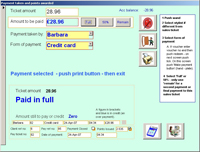 The payments screen records that your customer has paid and how i.e. Cash : Credit Card: Voucher etc You can accept multiple payments for each sales ticket allowing for your customer to pay using maybe a salon voucher plus another form of payment. The form of payments that your salons take are pre set by you, so you can be as detailed as you like.
At the end of the working day the system will work out what you should have in your till and divide this up into the forms of payment you have taken, so reconciling your days takings has never been easier.
Reward Points
Reward Points can be given to your customers for product sales and any services bought by them. Initially, you will set the number of points you'd like to award for each product or service, and then set how much each point is worth. You can then even s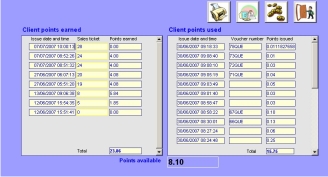 et certain days that will attract double points, or whatever multiple you have chosen. This is a great feature, as it entices customers into the salon on days that you might be less busy, i.e. double point days or Mondays. The Reward Points system is already incorporated into the system so it's ready to use if you want to.
Discount days
No matter how successful your business becomes, there are always going to be days that are quieter than others. SALONBase has a feature that allows you to give customers percenta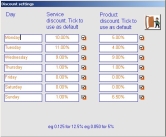 ge discounts on the days that you choose. The percentage discount can be used for either ‘services’ or ‘product sales’, or both. You can promote these discount days by adding a ‘promo’ statement to your customer’s sales tickets, or by adding it to your website, which is also advertised on the customer’s sales ticket.
SMS (text) messaging
Keeping your clients informed with relevant information about your salon is an important part of your customer-relationship management — and SALONBase is equipped with an SMS function to fulfil this role. SMS messages can be sent to all your database contacts or specifi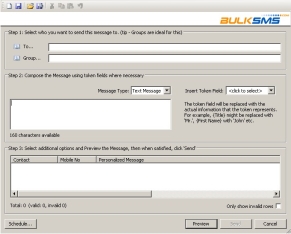 c groups, such as customers with birthday's approaching, or those that use a certain stylist, or clients that haven't used the salon for a while. Used correctly, this function will increase your profits and improve business performance.
SALONBase comes with 2 options for SMS applications, however you can incorporate another application if you prefer. As with most SMS applications you will need to pre-pay for the messages you intend to send.
Mailshot facility
SALONBase features a conventional mailshot facility al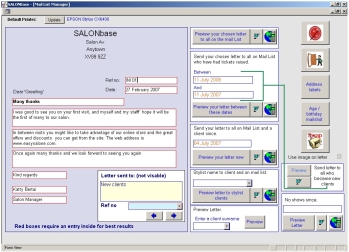 lowing you to send standard letters to your customers. The mailshot facility is easy to use, with letters quickly constructed by entering the contents into pre-set paragraph boxes. The purpose of the mailshot facility is similar to the SMS function and you can choose intended recipients based upon their status, history, or buying activity.
Style gallery
This feature allows you to capture and record your customers' ever-changing styles – of course, you will need a digital camera to do this. Once the image has been taken it can be stored on the system so that you can easily refer back to it. You also have the option to add the images to the Salon's own style gallery (you must of course ask the client if they agree to this)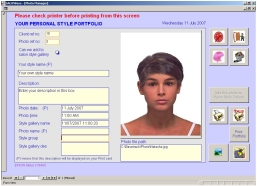 , and use it to show other clients style ideas and examples of work you'd done.
The system is able to print the image your customer wants a picture of. Whether you want to charge for this service is up to you.
Product sales and stock control
Whether you want to use the full stock control system or not, SALONBase gives you the opportunity to group your product by ‘brand’ then by ‘product type’, so finding and adding products to a sales ticket is both easy, accurate, and fast. You can enter an optional description of the product with a direct link to a web address for that product if you wish.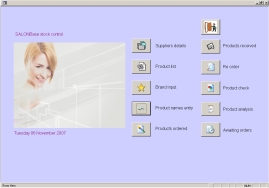
Adding products to a sales ticket using SALONBase is both intuitive for your staff and reduces the risk of mistakes being made.
From an administrators’ point of view all products sales can be monitored and each product can be tracked back to the sales ticket it was sold to – this is all done automatically without the need for any intervention by the user. Reports can be created daily by the push of one button to show all product sales on any given day.
